Etsy Sold Orders: How to find, manage, and track your sales | 2026
.png)
Find your Etsy Sold Orders by navigating to Shop Manager, clicking Orders & Shipping, and opening the New tab. This is where you can manage active, New Sold Orders that you haven't completed or shipped yet. Wait until the payment clears before you start packaging.
Here’s a guide based on how I’ve counseled new Etsy sellers about what Sold Orders are, why some orders don’t appear in the dashboard, and when to start fulfillment.
What are Etsy Sold Orders?
Etsy Sold Orders are purchases that shoppers have successfully placed by completing checkout steps in your shop. Once the shopper finishes checkout, the order moves out of the buyer’s cart and into your Shop Manager page.
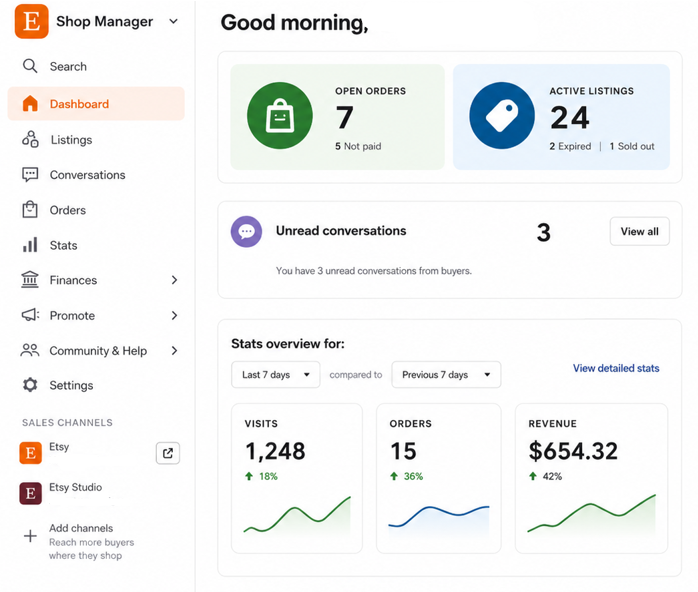
On the Shop Manager page, the sold order appears in the Orders section for you to review, prepare, and ship. Each sold order includes the following details:
- Purchased items
- Quantities
- Buyer information
- Chosen shipping method
- Current payment status
- Current fulfillment status
A sold order may show as new or open and sometimes as “payment processing.” This usually means that Etsy is still reviewing the purchase, so it’s not always immediately ready to ship. But Etsy still counts the sold order as a sale in your shop.
Items sitting in a buyer’s cart don’t count as Sold Orders. Sold items are also different from sold-out Etsy listings, which show that an item is currently out of stock.
Where to find your Etsy Sold Orders
Etsy Sold Orders don’t appear on your homepage. Find your Etsy Sold Orders by following these steps:
- Navigate to Shop Manager: Click Shop Manager and access your seller dashboard.
- Go to Orders & Shipping: Select Orders & Shipping (or Orders, depending on the current label) from the Shop Manager page. You’ll then find a list of your placed orders and can manage them.
- Click the New tab: Within the Orders or Orders & Shipping area, click the New tab to see orders that are not yet completed.
Note on desktop vs. mobile access differences: On desktop, you can see all your orders, and you also get tools like sorting and bulk actions to manage multiple orders. In the mobile app, you can still see orders, but Etsy limits filtering and bulk-management options. I recommend you use the app for quick checks rather than full order management.
What to do after you receive a sold order
After you receive a sold order, confirm that the buyer has paid and start preparing the item for shipping. Follow these steps:
Step 1: Confirm payment status
On your Orders or Orders & Shipping page, determine if Etsy’s system has processed the buyer’s payment. Even if you received a purchase notification, an order may still be under review, so don’t start packing it. If the payment has cleared, move on to step 2.
If not, waiting to ship too early risks sending an item before payment clears Etsy’s system.
Step 2: Prepare and package the item
When Etsy’s system tells you that the payment has cleared, get the item ready. I always tell sellers to create a fulfillment list that has the name of the customer, item description, and Etsy purchase details.
Here’s a look at a sample fulfillment list:
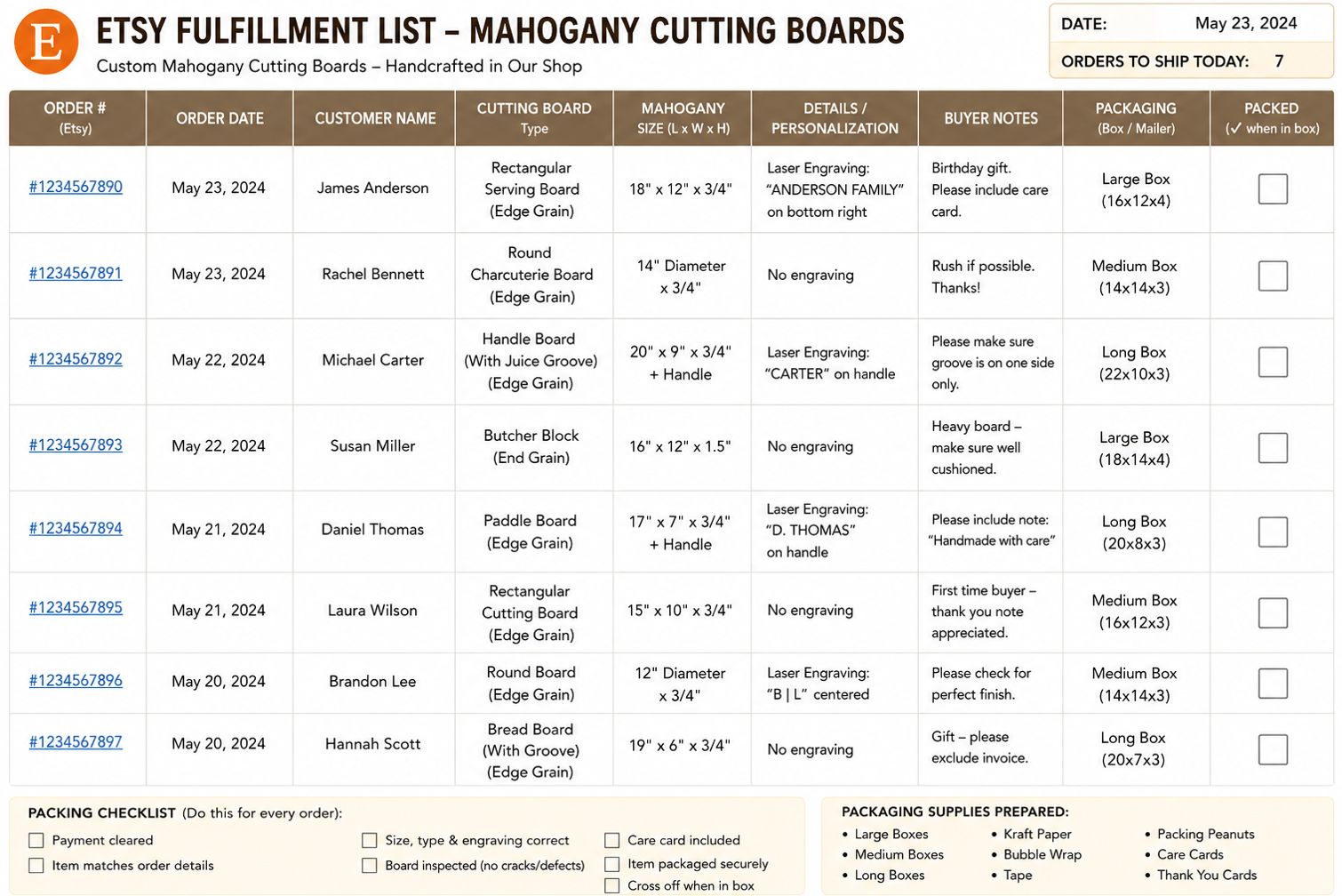
When packing the item, keep this list in front of you. The list helps you avoid mixing up items, sizes, colors, or personalization details.
If everything matches, package the item and cross it off the list.
Step 3: Ship
If you ship through Etsy, the tracking number automatically attaches to the order. Once you mark the order as shipped, the system notifies the buyer. Buyers can track the package directly from their order page.
Sellers who use their own shipping must manually add the tracking number to the shipping page to tell the buyer that their package is on the way.
Step 4: Message the buyer
Send the buyer a message through Etsy letting them know that you’ve shipped their order. Give them an estimated delivery window. Even though Etsy’s system notifies the buyer, a DM from you often reduces follow-up questions and shows professionalism.
Keep these messages to two sentences, max. Here’s an example:
“Hi Tom,
I just shipped out your 16” x 12” x 1.5” Butcher Block and have marked the order as shipped on Etsy. Feel free to reach out if you have any questions or concerns.”
How to download and track your Sold Orders
When you download your sold order data as a CSV, you can review your sales, costs, and performance more clearly. Here’s how:
Step 1: Export the CSV from your Etsy dashboard
The CSV export lets you move your sold order data out of Etsy in an organized file.
In Shop Manager, go to Settings, select Options, and open Download Data. Choose Orders from the dropdown, pick your date range, and download the file.
Without this file, you may have to enter numbers by hand or pull details from different parts of Etsy. That gets harder and more error-prone as your order volume grows.
Step 2: Check your transaction history
Your transaction and payout history live in a different place than your order export.
In Shop Manager, open Finances and go to your Payment account. You’ll see deposits, fees, adjustments, and other activity line by line.
This step helps you see the amount that hits your bank account. It also shows costs and other Etsy fees that lower your final payout.
Step 3: Understand what the data includes
Each row in the CSV usually includes details like item price, shipping charged, taxes, and Etsy fees. The exact fields may depend on your export type and shop settings.
These fee columns help you see your real margins. Instead of looking only at the item price, you can compare price, shipping, taxes, and fees in one row.
When an Etsy item shows as sold, but no order appears: At a glance
A sold-out Etsy listing without a visible order usually comes from system processing lag or third-party tool delays. Here’s why you’re most likely not seeing an order:
- Incomplete payment: Sometimes, Etsy doesn’t mark inventory as sold while it processes a payment. During that time, the order may appear as pending or processing. Wait for a few minutes and refresh your page to confirm.
- Canceled or refunded order: When you or the buyer cancels or refunds an order, it usually moves to a canceled status. Etsy might also cancel the order if it finds the buyer has insufficient funds. The listing may still appear inactive or sold out before the system makes an update.
- Inventory sync delay: Sometimes, multichannel crosslisting tools can cause inventory syncing issues on Etsy. A listing might show as sold out before the matching order appears on Etsy. Refresh the page and check your tool to confirm whether the data has finished syncing.
- Expired listing or auto-renew turned off: Listings can also disappear from your active shop if they expire or you’ve disabled auto-renew. But the order still exists in your Shop Manager and payment records. The listing itself may appear inactive, expired, or sold out instead of active in your storefront.
Final thoughts on Etsy Sold Orders
Sold Orders act as the main record of transactions in your Etsy shop. They help you track what customers bought and which orders still need fulfillment.
The Sold Orders view in Shop Manager can serve as your main reference point for sold items. The view also lets you handle fulfillment, shipping updates, and buyer messages from one place.
You can also use regular CSV exports to spot shop trends. For example, you may notice that certain listings create more disputes or issues compared to the revenue they bring in.
Information from your CSV can help you adjust pricing or update your shop’s policies. You can make decisions based on real sales and fulfillment data.
Get sold order data from many marketplaces with Nifty
If you want a tool that gives you data similar to the CSV from Etsy Sold Orders for listings across multiple marketplaces, Nifty’s your huckleberry. Nifty is an automation and crosslisting tool that lets you upload your Etsy listings to other platforms so you can increase your buyer base.
But Nifty does much more than that:
- AI-powered listing builder: Snap a photo and Nifty's AI generates SEO-optimized titles, descriptions, and hashtags. You can train it to match your existing listing style so output stays consistent across platforms.
- One-click crosslisting: Post to Whatnot, Poshmark, eBay, Mercari, Depop, and Etsy in a few clicks. No copy-pasting between tabs, and no annoying plugins.
- Automatic delisting on sale: When an order sells, Nifty automatically pulls the listing from every other marketplace. It eliminates double-sales and awkward “Sorry, it’s already sold” messages.
- Bulk actions and scheduling: Relist and share inventory daily without annoying plugins that must stay open 24/7. Schedule drafts to go live with a delay. Set automatic discounts that deepen over time without manual updates.
- Sales and performance tracking: Monitor Sold Orders, fees, top performers, and slow movers in one dashboard. Set seller goals and track progress from your home screen instead of building your own spreadsheet logic.
Nifty pays for itself in just a few weeks. Start with a 7-day free trial and see your sold order data from several platforms in one place.
FAQs
1. What does a sold order mean on Etsy?
On Etsy, a sold order means a buyer has completed a purchase and finished checkout. The order is currently being processed by the Etsy system. Sold Orders appear in your Shop Manager for fulfillment. Tracking these accurately reduces overselling risk and keeps your records clean.
2. How do I see my sold items on Etsy?
See your Sold Orders on Etsy by navigating to Shop Manager, clicking on Orders & Shipping, and then opening the New tab. Desktop gives you the fullest view, including sorting and bulk actions. Using this regularly cuts manual tracking effort across high-volume periods.
3. Why does my listing show sold out, but no sale?
A listing can appear sold out for several reasons, such as a payment that’s still processing, a canceled order, an inventory sync issue with a third-party tool, or earlier sales that exhausted the available quantity. In some cases, a quick refresh may help the display catch up. If the mismatch remains, review your Orders view, payment activity, and connected inventory apps.


.png)